

OPNsense Installation
The QuFabric client (agent) allows a peer to join a pre-existing QuFabric deployment. If a QuFabric deployment is not yet available, there are both managed and self-hosted options available.
The QuFabric package is officially included starting from OPNsense 25.7.3.
Prerequisites
- Shell or Web UI access to your OPNsense system
- A setup key to authenticate and register the OPNsense device
Installation
-
Log in to your OPNsense system
You can use the Web UI or SSH.
-
Install the QuFabric package
In the OPNsense Web UI, navigate to
System>Firmware>Plugins, and search for theos-qufabricpackage. Click the install button next to it. -
Verify the installation
Once installed, the QuFabric configuration interface will be available under
VPN>QuFabricin the OPNsense menu
Configuration
Enable the service
Navigate to VPN > QuFabric > Settings and ensure the toggle Enable is turned on in the General section.
This will enable us to continue with the next steps.
Authenticate the machine
Fill out the authentication form with the following values and click Save:
- Management URL: Default is
https://api.qufabric.io:443. If self-hosting, enter your custom management server URL. - Setup Key: Paste the setup key from your QuFabric account.

Verify Connection Status
The Status page shows detailed information about connected peers and control services, helping you monitor your deployment.
Access it via VPN > QuFabric > Status in the OPNsense menu.
Use this section for diagnostics and troubleshooting common connection or setup issues.
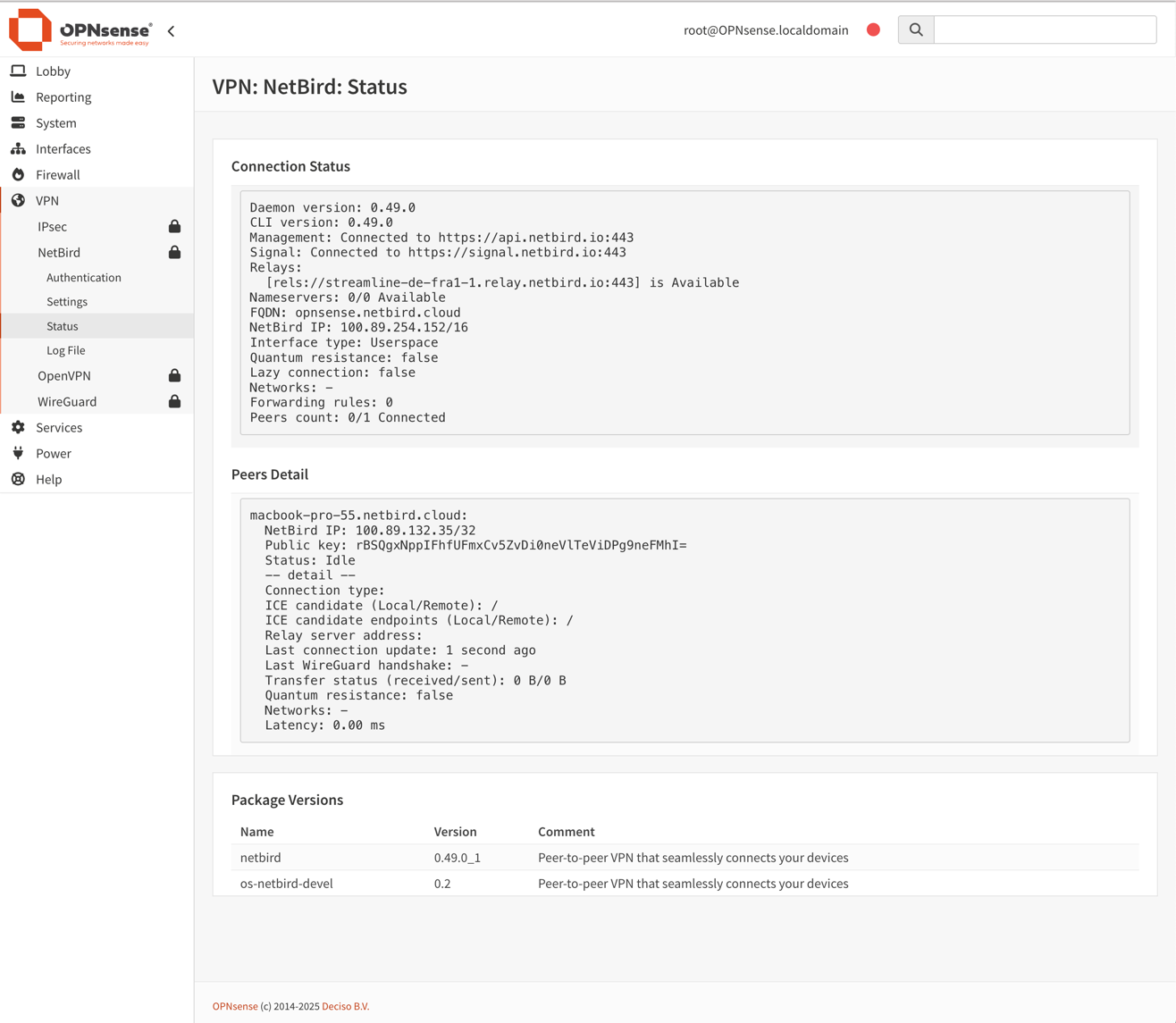
Assign QuFabric interface
After installation, a new interface named wt0 will be available but unassigned. To assign it go to Interfaces >
Assignments. Under Assign a new interface, set the following values:
- Device:
wt0 - Description:
QuFabric

Click Add to assign the interface.

Enable the QuFabric interface
Now that the QuFabric interface has been added, you need to enable it. Go to Interfaces > [QuFabric], then configure
the following options and click Save, then Apply changes to activate the interface:
- Enable:
✓ Enable Interface - Lock:
✓ Prevent interface removal
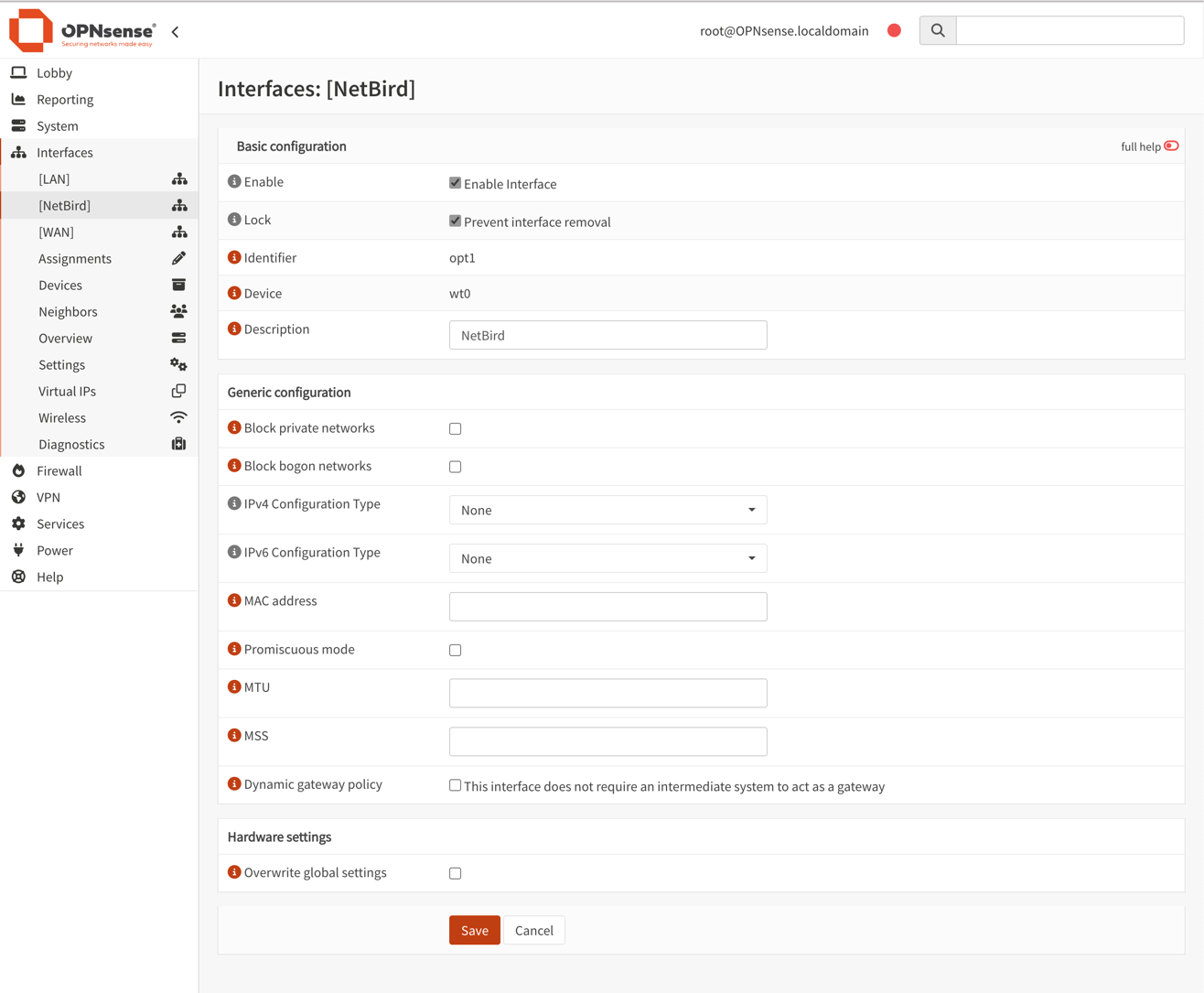
OPNsense includes native WireGuard support, however do not configure or manage the QuFabric interface (wt0) via the OPNsense WireGuard UI. QuFabric fully manages the WireGuard interface and keys.
Configure Firewall Rules for the QuFabric interface
To allow QuFabric to handle all access control, permit all traffic on the QuFabric interface in OPNsense. This ensures traffic flows freely, while QuFabric’s own policies (ACLs) govern the access restrictions.
- Navigate to
Firewall>Rules>QuFabric. - Click
+ Addto create a new rule. - Configure the rule:
- Action:
Pass - Interface:
QuFabric - Direction:
in - TCP/IP Version:
IPv4 - Protocol:
any - Source:
any - Destination:
any - Description:
Allow all on QuFabric (managed by QuFabric)
- Action:
- Click
Save, thenApply changes. - Ensure this rule is at the top of the
QuFabricrules list so it isn’t shadowed by other rules.
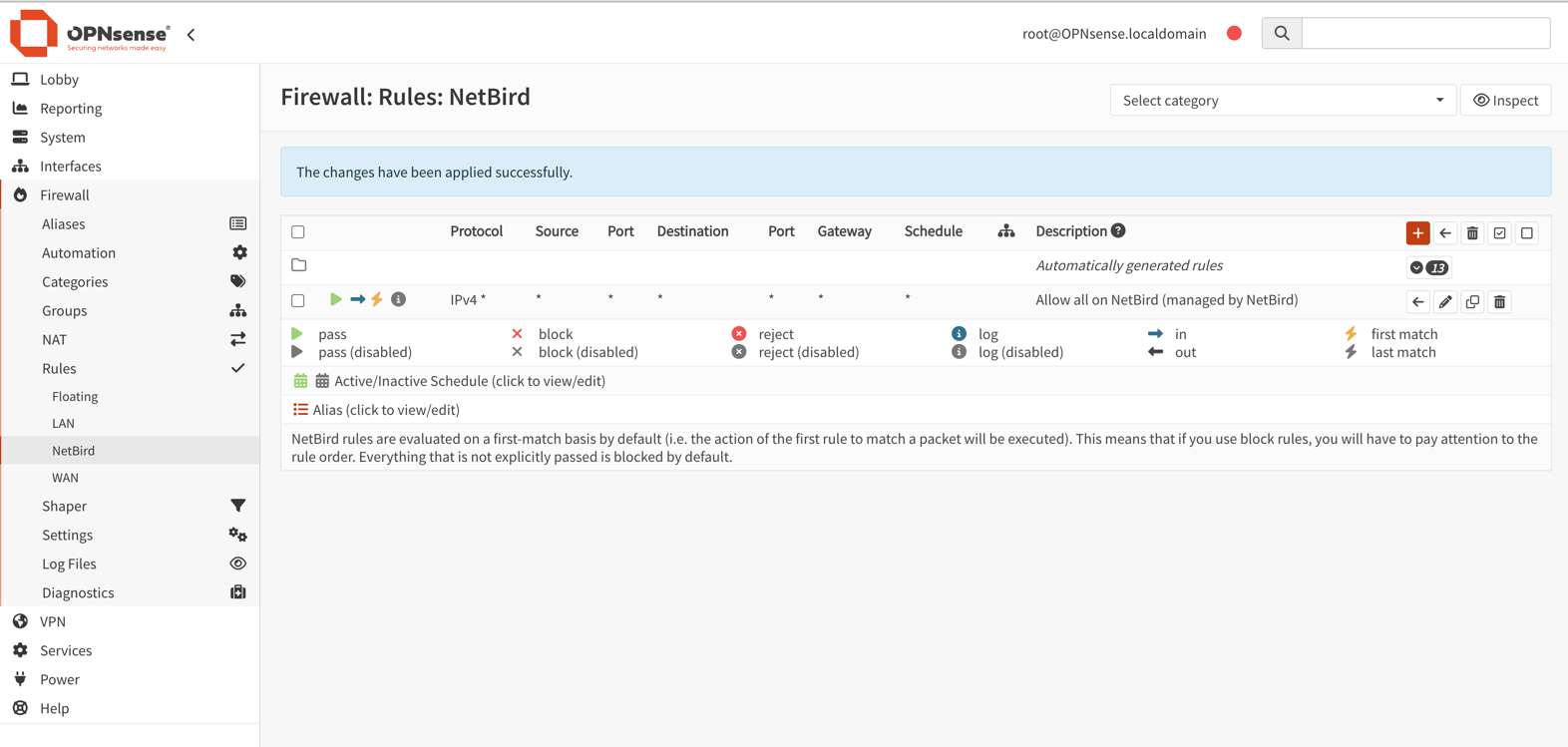
Config for Troubleshooting Relayed Connections
By default, OPNsense uses automatic outbound NAT which randomizes source ports. This can cause issues with QuFabric's NAT traversal (hole punching). To ensure reliable direct connections, you must configure a Static Port mapping.
-
Change Outbound NAT Mode:
- Navigate to
Firewall>NAT>Outbound. - Select
Hybrid outbound NAT rule generation. - Click
Save.
- Navigate to
-
Add Static Port Rule:
- Click
+to add a new rule. - Interface:
WAN - TCP/IP Version:
IPv4 - Protocol:
UDP - Source address:
Single host or Network(enter the IP address of your QuFabric host) - Destination address:
any - Translation / Static-port: Check
Static-portbox - Description:
QuFabric Static Port - Click
Saveand thenApply changes.
- Click
-
Reset States:
- Go to
Firewall>Diagnostics>States. - Filter by the QuFabric host IP.
- Delete the states.
- Go to
-
Restart QuFabric:
- Run
qufabric service restarton the device. - Run
qufabric status -dto verify the connection.
- Run
Get started
- Make sure to star us on GitHub
- Follow us on X
- Join our Slack Channel
- QuFabric latest release on GitHub